Creating a Nonlinear Part
Overview
By using a script to change part parameters according to conditions, you can emulate a part whose characteristics change nonlinearly. Specifically, this can be achieved in two ways: writing an approximate expression directly in the script, or calling a lookup table with the function table.
Sample Circuit
Info
Required option: Digital Palette
Creating It with a Script
By using a script to change part parameters according to conditions, you can emulate a part whose characteristics change nonlinearly.
With a script, you can emulate an Inductor that has DC superposition characteristics like the following.
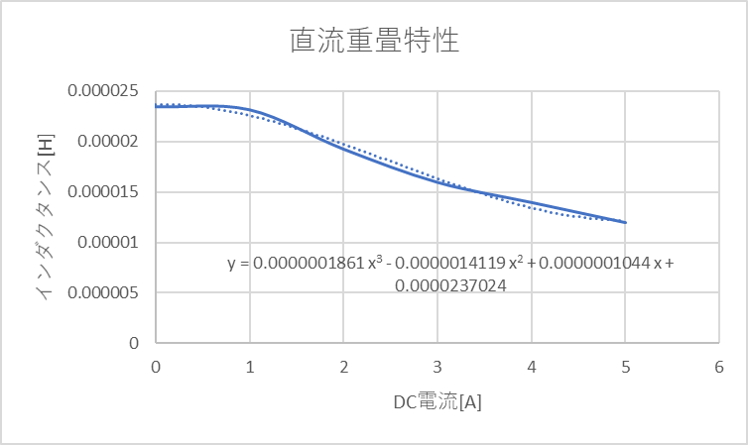
The approximate expression was calculated with the functions of Excel.
Using an Approximate Expression
The nonlinear part is emulated by writing the approximate expression directly in the script.
Write the script as follows to change the value of the Inductor L.
    /* Get the current of L */
    I = output("L.I","I","AVE");
    /* Derive the inductance with the approximate expression obtained from the DC superposition characteristics of L */
    Inductance = 0.0000001861 * pow(I,3) - 0.0000014119 * pow(I,2) + 0.0000001044 * I + 0.0000237024;
    /* Update the inductance of L with the setparam function */
    setparam("L","value",Inductance);

    /* Set Inductance as an output variable */
    setoutvar(Inductance);
Using a Lookup Table and the Function table
The nonlinear part is emulated by defining the nonlinear characteristics in a lookup table and calling it with the function table.
Steps to Create the Lookup Table
- Create a
lookup tablefrom New in theFilemenu, and change itsNameto nonlinear. -
Create the data as shown in the figure and save it.
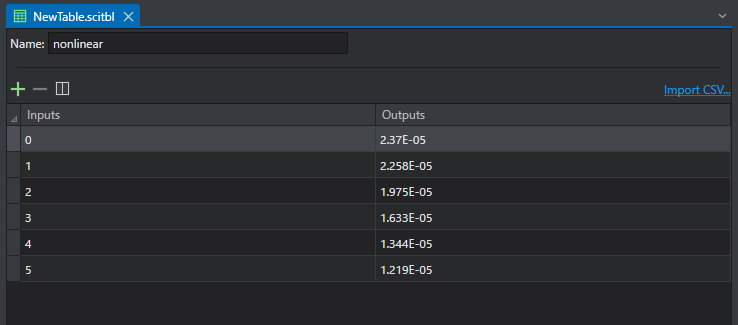
* Each value is a representative point of the DC superposition characteristics. -
Register the saved lookup table file in the
Lookup Tablemenu of theconfig editor.
Calling the Lookup Table
Next, call the table created above from the script.
The table is called with the function table(table name, x value).
    /* Get the current of L */
    I = output("L.I","I","AVE");
    /* Derive the inductance with the created table */
    Inductance = table("nonlinear",I);
    /* Update the inductance of L with the setparam function */
    setparam("L","value",Inductance);

    /* Set Inductance as an output variable */
    setoutvar(Inductance);