Calculation features: Signal generation
Signal generation feature
Eschart can generate any signal waveform by setting various parameters.
Signal generation window
Click Generator from the menu of  to open
signal generation.
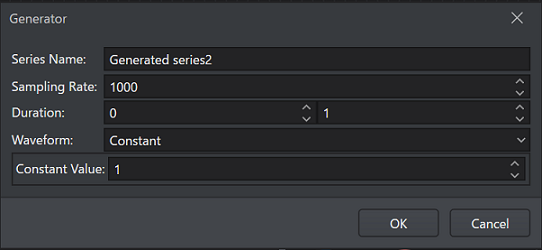
| Name | Function |
|---|---|
| Series name | Specifies any series name. |
| Sampling rate | Enter the sampling frequency. |
| Duration | Enter the start time and the end time. |
| Waveform type | Select from constant line, step wave, ramp wave, sine wave, square wave, and random wave. |
Settings for each waveform type
Constant line
| Name | Function |
|---|---|
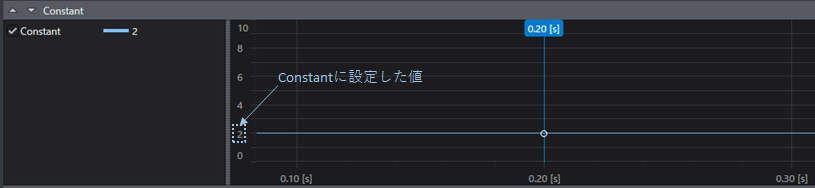
| Constant | Specifies the constant value of the vertical axis. |
Step wave
| Name | Function |
|---|---|
| Step time | Specifies the time at which the step change occurs. |
| Initial value | Specifies the value before the step change. |
| Final value | Specifies the value after the step change. |
Ramp wave
| Name | Function |
|---|---|
| Slope | Specifies the slope. Specifies how much it increases per second. |
| Transition start time | Specifies the time at which it transitions to the slope line. |
| Initial value | Specifies the initial value. |
Sine wave
| Name | Function |
|---|---|
| Amplitude | Specifies the amplitude. |
| Frequency | Specifies the frequency. |
| Phase | Specifies the phase shift. Specify it in the range from -360° to 360°. |
| Offset | Lets you specify an offset value. |
Square wave
| Name | Function |
|---|---|
| Amplitude | Specifies the amplitude. |
| Frequency | Specifies the frequency. |
| Duty | Specifies the duty ratio. |
| Phase | Specifies the phase shift. Specify it in the range from -360° to 360°. |
| Offset | Lets you specify an offset value. |
Random wave
| Name | Function |
|---|---|
| Minimum | Specifies the minimum value of the random values. |
| Maximum | Specifies the maximum value of the random values. |
| Seed | Lets you specify the seed value that is the basis of the random number generation. Even if the minimum and maximum values are the same, a different waveform is generated each time when no seed value is specified, but when a seed value is specified, exactly the same random waveform is generated. |
Setting procedure
-
Set any series name in
Series Name. -
Enter the sampling frequency in
Sampling Rate. -
Enter the start time and the end time in
Duration. -
Select the waveform type from the
Waveformlist. -
Set the parameters for each waveform type.
Settings and generation example of Constant
Constant: 2
Settings and generation example of Step
Step Time: 0.5
Initial Value: 1
Final Value: 2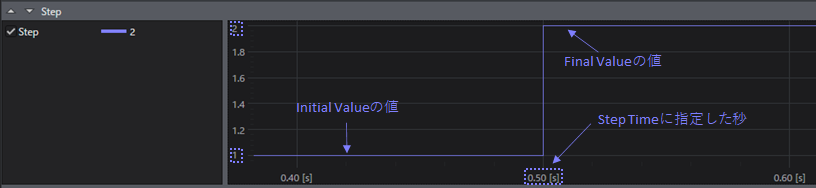
Settings and generation example of Ramp
Slope: 2
Start Time: 0.5
Initial Time: 1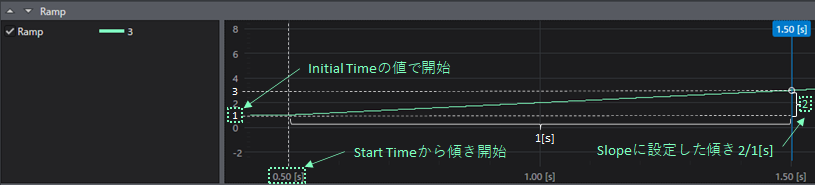
Settings and generation example of Sine
Amplitude: 2
Frequency: 4
Phase: 0, 90
Offset: 1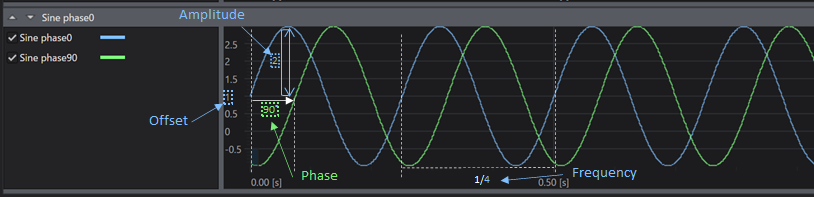
Settings and generation example of Square
Amplitude: 2
Frequency: 4
Phase: 0
Duty: 50, 30
Offset: 1, 0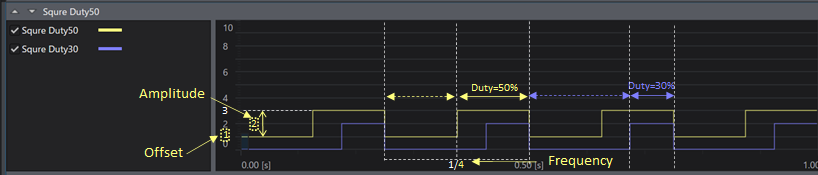
Settings and generation example of Random
Minimum: -1
Maximum: 1
Seed: 3, not specified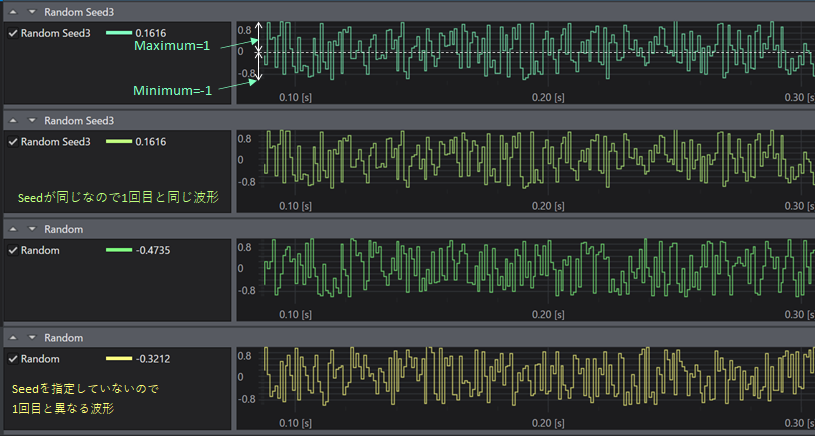
-
When you click the
OKbutton, a waveform with the conditions you set is generated.